Watchbook
Previously called Likes Search for YouTube.
A likes search for the YouTube videos you have liked.
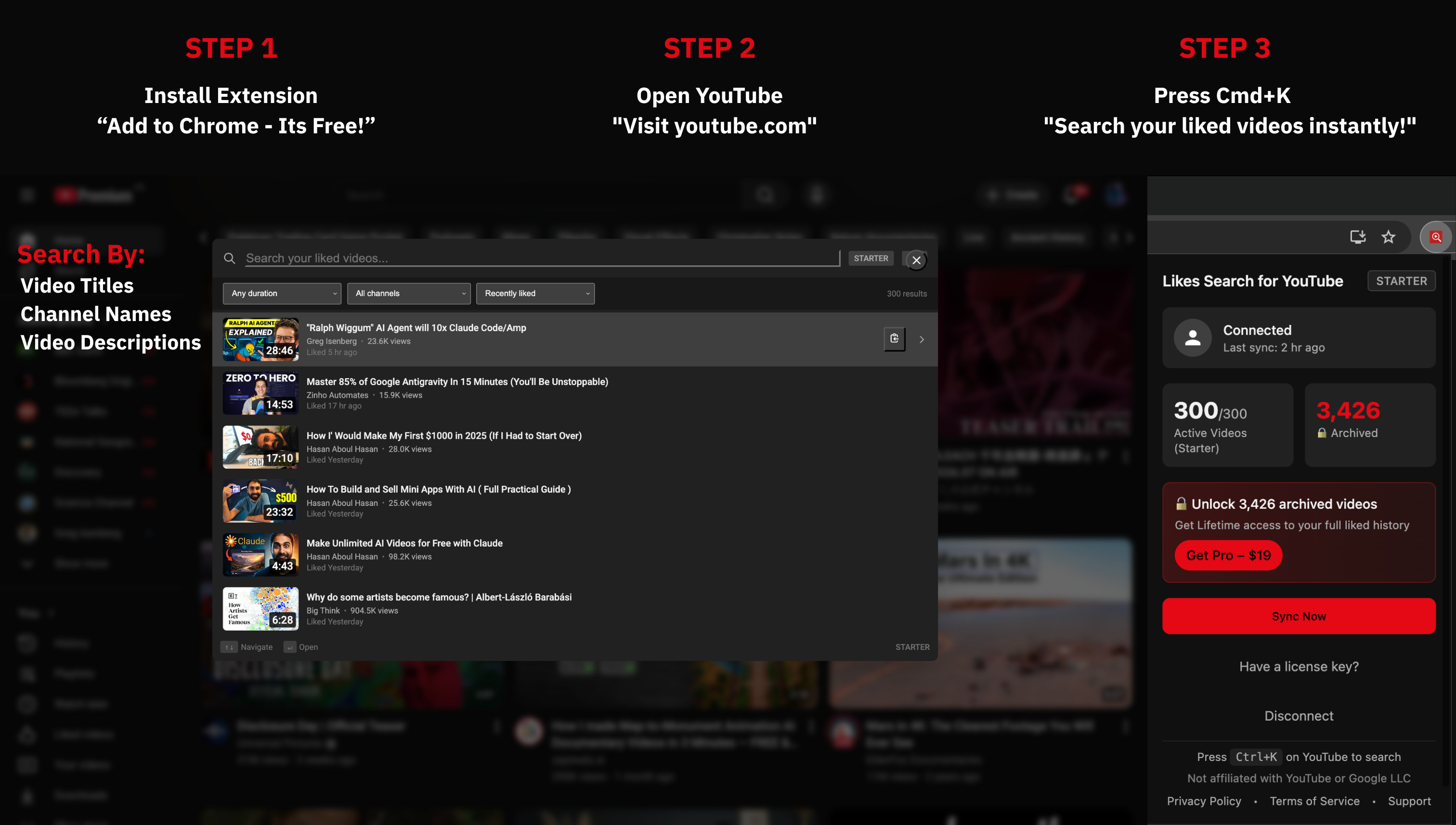
Press Ctrl+K or Cmd+K on any YouTube page to find a liked video in seconds. Keep collections and private notes, export a copy or a list of links when you need one, and leave your library in this browser.
Find a liked video
Press Ctrl+K or Cmd+K on any YouTube page. Search is forgiving of typos, and a match in a note shows up under the videos.
Keep what matters
On the Workbench page: collections you build by hand, Smart Collections that update from a saved search, and pins for the videos and channels you come back to. Select several to add them to a collection, copy their links, or open them.
Write it down
One private note per video or collection, with clickable timestamps. Take a quick note from Ctrl+K while the video plays.
Take it elsewhere
CSV, JSON, Markdown, or a list of links, for your results, a collection, or the whole library. Copy links to paste into NotebookLM yourself. The extension opens NotebookLM; it never controls it.
See the channels
On the Workbench Channels page: YouTube's public numbers for the channels in your likes, each dated, refreshed when you ask. Nothing is ranked or totalled.
It stays yours
Your likes, collections, and notes live in this browser. Read-only access to YouTube. The extension never changes your account.
Your liked videos, collections, and notes stay in your browser; they are never sent to our servers. The extension reads YouTube through Google's official API with read-only access and never changes your account. Pro sends only license data (the key, a random device ID, and the extension version) to our server, and payment goes to Stripe. Stored video details are re-checked in the background so they stay current, and are deleted if the extension cannot sync for 30 days (see the privacy page for the exact limits). Disconnect removes the YouTube data from the browser at once and keeps the words of your notes.
Simple, Fair Pricing
Starter searches your 300 most recent likes. Pro is $19 once, for your whole liked history.
Starter
- Your 300 most recent liked videos
- Ctrl+K / Cmd+K search, forgiving of typos
- Length presets and one channel; one 30-minute preview of the other filters
- 3 collections and 1 Smart Collection
- Notes on 10 videos; a note on a collection is free
- Up to 4 videos selected at once
- One export or send of up to 50 videos
- One refresh of public channel numbers, up to 100 channels
- Pins for up to 30 videos and 20 channels (same on Pro)
Pro
- Your whole liked history
- Unlimited collections, Smart Collections, notes, and selections
- Every filter: custom length, liked and upload dates, view counts, several or excluded channels
- Export and send any size (CSV, JSON, Markdown, links to paste into NotebookLM)
- A channel-numbers refresh every day, up to 100 channels
- Auto-sync every 2 hours, 6 hours, or daily
- Pressing Sync removes likes you took back on YouTube
- Up to 3 devices; an unused slot frees itself after 31 days
- $19 once, lifetime, with a 30-day money-back guarantee
- If Pro cannot be verified, nothing you built is deleted
Frequently Asked Questions
Everything you need to know about Watchbook, the extension that searches the YouTube videos you have liked.
Your liked videos, collections, and notes stay in your browser. They are never sent to our servers. The extension reads YouTube through Google's official API with read-only access and never changes your account. Pro sends only license data (the key, a random device ID, and the extension version) to our server, and payment goes to Stripe. Stored video details are re-checked in the background so they stay current, and are deleted if the extension cannot sync for 30 days. Disconnect removes the YouTube data from this browser at once and keeps the words of your notes. Exports (CSV, JSON, Markdown, or a list of links) are generated on your device and saved only to your computer.
The extension is for YouTube.com and your liked videos. YouTube Music is not supported.
Press Ctrl+K (Windows) or Cmd+K (Mac) on any YouTube page. The search panel opens and you can type to find a liked video. Notes that match appear under the videos. Open the Workbench from the toolbar icon for collections, your library, notes, and channel numbers.
Starter covers your 300 most recent liked videos: search, length presets and one channel, one 30-minute preview of the other filters, 3 collections and 1 Smart Collection, notes on 10 videos (a note on a collection is free), up to 4 videos selected at once, one export or send of up to 50 videos, one refresh of public channel numbers for up to 100 channels, and pins (up to 30 videos and 20 channels). Pro covers your whole liked history: every filter, unlimited collections, Smart Collections, notes, and selections, exports of any size, a channel-numbers refresh every day (up to 100 channels), and auto-sync every 2 hours, 6 hours, or daily, on up to 3 devices. Pay once ($19) for lifetime access, with a 30-day money-back guarantee. If Pro cannot be verified, nothing you built is deleted. On Pro, pressing Sync also removes likes you took back on YouTube. Automatic sync does not.
Yes. Use Export in the Cmd+K / Ctrl+K search, or Send on a collection in the Workbench. Choose your current results, a collection or the whole library. Formats: CSV (Sheets/Excel/Notion), JSON (full backup), Markdown (shareable list), and a list of video links you can paste into NotebookLM yourself. Everything is generated on your device; we never upload your library. On the free plan, your first export or send of up to 50 videos is free; Pro has no limit.
Yes! We offer a 30-day money-back guarantee. If Pro doesn't meet your expectations, contact sophytedigital@gmail.com and we'll process your refund, no questions asked.
Yes. Watchbook was previously called Likes Search for YouTube. It is the same Chrome extension. Your install stays in place, and a Pro license still works.
Not at this time. The extension is designed for individual use. Each Pro license can be activated on up to 3 Chrome profiles or devices. If all 3 slots are in use, a slot that has not been used for 31 days is freed automatically when you activate on a new device. To free one sooner, email sophytedigital@gmail.com and we will free a slot for you. Contact us if you have specific enterprise needs.